The Font Identification Knowledge Base

Find any font
from any image

Want to find a font from an image? We ran the same five test images through every major font finder and compared the results — so you can pick the right tool for your image in seconds.

Real tests
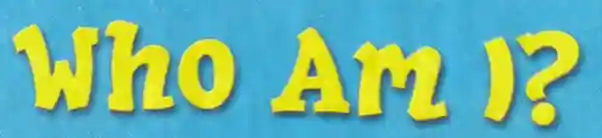
Sample image containing the text Who Am I?
86%
Best match font preview Best match font preview
HipHopDemi by Jill E. Pichotta
Best Match
81%
Similar font preview Similar font preview
Sweet Cookies by Fontlicious
Similar
Real world testing
Identified by 3 tools

The Process

How to find a font from an image in 4 steps

From screenshot to font name in minutes — the step-by-step process for finding a font from any image or photo.

01

Capture the text

Take a screenshot or photograph containing the mystery font. Crop tightly around the text for best results.

02

Prepare your image

Ensure the text is clear and high-contrast. Correct any perspective skew and separate touching letters — the two things that defeat most font finders.

03

Upload to a tool

Choose a font finder below, upload your image and box one line of text. Results arrive within seconds.

04

Verify the match

Compare the suggested font against your source. Cross-check using a second tool if you're unsure.

Font Identification Tools

The best tools to find a font from an image in 2026

Every tool here was stress-tested on the same five images — clean commercial type, a free Google Font, a script and a perspective-distorted sign. Open a full review for the results.

Web / Desktop
WhatTheFont
Web App

The industry gold standard. MyFonts' AI engine searches 400,000+ commercial fonts with no account or limits. Excellent on clean commercial type, but it never names free fonts like Google Fonts, and perspective-distorted images defeat it.

Free 400K+ fonts AI-Powered
WhatFontIs
Web App

Searches 1.2M+ fonts across commercial, Google Fonts and DaFont libraries, with free alternatives beside every match. Guided crop-and-segment workflow, REST API and browser extension; the free tier is capped per day.

Free tier + Paid 1.2M+ fonts Free Alternatives API
Find my Font
Desktop App

A Windows and Mac app that scored 5.0/5 in our stress test — the only tool to identify all five images, including the perspective-distorted sign. Manual letter selection and correction tools take more effort but pay off on hard images.

Free trial, Pro 1.2M+ fonts Scans local fonts
Font Matcherator
Web App

The engine behind both Fontspring and Font Squirrel: free, no account. Strong on bold headline and logo lettering, weak on scripts and photographed text; most matches are paid, with a small free set on Font Squirrel.

Free 900K+ fonts No account
Adobe Fonts Visual Search
Web App

Upload an image, box a line of text, and Adobe matches it against the Adobe Fonts library. Free to search with no account. Matches activate into Photoshop, Illustrator and InDesign in one click — licence included, no checkout.

Free to search 30K+ styles Creative Cloud
LikeFont
Web App

The strongest option for Chinese, Japanese and Korean lettering — scripts the major Latin-focused tools don't index at all. Searches close to 2.9 million fonts, handles Latin typefaces too, and scored 4.2/5 in our stress test. Free, no account.

Free 2.86M fonts CJK Support Browser-Based
Mobile
WhatTheFont
Mobile App

The MyFonts app brings WhatTheFont's AI engine to your pocket. Snap a photo of any text and instantly identify the font — great for spotting type in the wild.

iOS / Android 400K+ fonts AI-Powered Free
Find my Font
Mobile App

An iOS and Android app that identifies fonts from your camera or photo library. You pick the letters and can correct perspective, which handles angled signs.

iOS / Android 1.26M fonts Free + Paid Image correction
Community
Reddit
Community Method

Post your image to communities like Reddit's r/identifythisfont or TypeID. Experienced typographers often identify obscure or custom lettering that automated tools miss.

Community Reddit Custom Lettering
Dafont Forum
Community Method

Dafont's Font identification board lets you attach your image to a thread. Replies name the typeface, and the suggestion is pinned to the top of the thread — often within the hour.

Community Free Fonts Fast Replies

Comparison Matrix

Find font from image: web & desktop tools compared

Which font finder should you use? Database size, price, free-font coverage and our stress-test score side by side. Scores are the average over the same five test images.

Comparison of web and desktop tools that find a font from an image
Tool Platform Fonts Price Finds free fonts Stress test Best for Main weakness
Find my Font Windows & Mac app 1.2M+ 30-day trial, then $49 one-time Yes 5.0 Hard images: skewed signs, logos, scripts Manual letter selection; paid after trial
LikeFont Web 2.8M+ Free, no account Yes 4.2 Chinese, Japanese & Korean lettering No easy way to download fonts (even free ones)
WhatFontIs Web (+ API, extension) 1.2M+ Free daily limit, paid plans Yes 3.8 Finding free alternatives Daily free cap; dated interface
WhatTheFont Web 400K+ Free, no account No
(MyFonts only)
3.6 Clean commercial type Perspective distortion; no free fonts
Adobe Fonts
Visual Search
Web 30K+ Free to search; sign-in to activate No
(Adobe library only)
3.6 Photoshop, Illustrator & InDesign users Smallest catalogue
Font Matcherator Web 900K+ Free, no account Yes
(Font Squirrel)
2.4 Bold headline & logo lettering Scripts and photographed text

Quick pick: need the most accurate result and don't mind installing software? Use Find my Font. Want a free web tool? Start with WhatFontIs, then cross-check with WhatTheFont. Working with CJK text? Use LikeFont.

Pro Tips

Tips for finding fonts from images more accurately

Small adjustments to your image before uploading make a big difference in how accurately these tools can find the font.

Crop tightly around the text

Remove backgrounds and visual noise. A tight crop focused on the letterforms significantly improves AI recognition accuracy.

Maximize contrast

High contrast between text and background is essential. Boost contrast in any image editor before uploading for cleaner results.

Include uppercase AND lowercase

If possible, capture both cases. Unique letterforms like 'g', 'a', 'Q' and 'R' are distinctive identifiers for many typefaces.

Try multiple tools

No single tool is perfect. If WhatTheFont returns no match, try Font Matcherator or WhatFontIs. Cross-referencing gives higher confidence.

Use the highest resolution available

Low-resolution or heavily compressed images produce blurry edges. Source the highest-quality version of the image you can find.

Ask the community for help

Custom lettering, hand-drawn fonts, and obscure typefaces often stumped automated tools. r/identifythisfont has over 200k expert members.

FAQ

Frequently asked questions

Answers to the most common questions about how to find a font from an image.

Upload your image to a font finder such as WhatTheFont, WhatFontIs or Adobe Fonts Visual Search and draw a box around one line of text. These tools compare the letterforms in your image against databases of 30,000 to 2.8 million fonts and return ranked matches within seconds. For best results, crop tightly, keep high contrast, and correct any perspective skew first.

It depends on the image. WhatTheFont is free with no account and searches 400,000+ commercial fonts. WhatFontIs covers 1.2M+ fonts including Google Fonts and DaFont, but caps free searches per day. LikeFont is free and the only one that handles Chinese, Japanese and Korean. The most accurate in our stress test was Find my Font (5.0/5), which is a free 30-day trial then $49 one-time. See the comparison matrix.

Use the Find my Font app (available for iOS and Android) or WhatTheFont Mobile. Both let you photograph text on a sign, poster or screen and identify the typeface from your phone. Find my Font gives you five free identifications a day; WhatTheFont is free but matches only the MyFonts catalogue.

Common reasons: the image may be too low-resolution or low-contrast, the text could be custom lettering or hand-drawn (not a digital font), or the typeface may be too obscure for that tool's database. Try boosting the image contrast, cropping more tightly, or cross-checking with a second tool. For truly tricky fonts, the r/identifythisfont community on Reddit is highly effective.

Yes. For live websites, use a browser extension like WhatFont or Fonts Ninja — they inspect the page's CSS and display the exact font name instantly, without any image upload needed. This is faster and more reliable than image-based identification for live web pages.

Many logos use modified versions of existing fonts, or are entirely bespoke. Font identification tools will often suggest the closest matching typeface — a useful starting point. For truly custom lettering, posting to the r/identifythisfont community or consulting a professional typographer gives the best chance of a correct answer.

Ready to find a font from your image?

Pick any tool from our curated list and find the font in your image in under a minute — most are completely free.