
The manual approach, on a phone
Find my Font for Android is Softonium's mobile companion to the desktop application reviewed here, and it carries the same philosophy across: you do the preparation, the engine does the matching. Where most phone apps try to guess what you meant from a snapshot, this one hands you a letter-selection screen and expects you to use it.
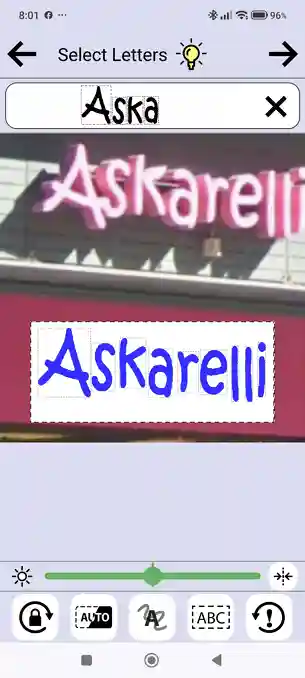
That makes it slower than the one-tap competition and considerably more capable. The Select Letters screen carries a brightness and threshold slider, a rotation lock, automatic letter detection, a paint tool for separating connected or fragmented letters, and a selection area that can be switched between fixed, rectangular, deformation-fix and perspective-fix modes. A photograph of a sign shot from below at an angle — exactly the situation that defeats a one-tap tool — can be squared up before matching rather than simply failing.
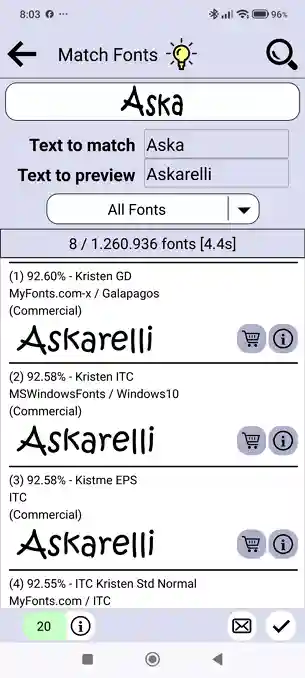
Results are unusually transparent. Each candidate carries a percentage match, the foundry and the source it came from, and the app tells you how many fonts it searched and how long it took. You also supply two pieces of text: the letters you actually selected, and separate preview wording so you can compare a candidate against the original image in context.
The catch is the quota. Identification runs on Softonium's servers and is metered: five free requests every 24 hours, with a bonus of 30 on first use. Beyond that you wait, buy credit, or pair the app with a Find my Font Pro installation on your PC, which lifts the cap entirely. The app also nudges you toward the desktop edition for a reason it states on its own start screen: only the desktop version can match against the fonts already installed on your computer.
What the app offers
The start screen reports 1,260,936 fonts searchable — the same catalogue the desktop edition uses, and one of the largest of any identification tool we have reviewed.
Pick between one and seven Latin letters yourself. Tapping the most distinctive characters gives the engine far better material than a whole-word crop.
Four selection modes — fixed, rectangular, deformation fix and perspective fix — let you straighten lettering photographed at an angle before it is matched.
Paint over characters that the automatic detector cannot separate. This is the tool for script faces with connected letters, or lettering broken up by glare and shadow.
Every candidate shows a percentage match, its foundry and whether it is commercial, plus a count of how many fonts were searched and how long the search took.
Connect the app to a Find my Font Pro account on your PC and the daily cap is lifted — the request counter changes to a star and identifications become unlimited.
How to use the app
From a photograph to a named, licensable typeface in five screens. Tap any screenshot to enlarge it.
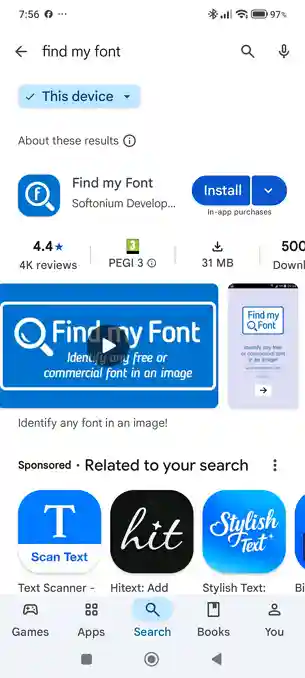
Find my Font is published by Softonium Developments for iPhone, iPad and Android. The Google Play listing we installed from is a 31 MB download past half a million installs, rated 4.4★ across 4,000 reviews, and declares in-app purchases up front. No account is needed to start identifying.
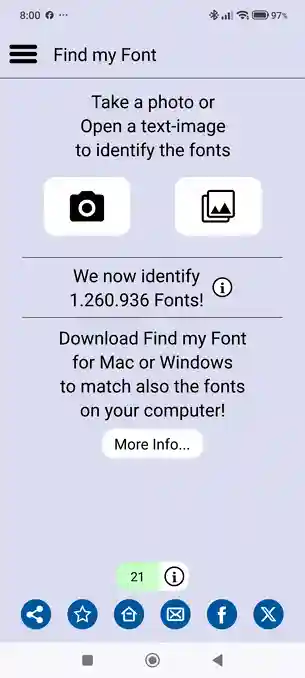
The home screen offers two buttons: take a photo, or open an image already on the device. It also reports the live catalogue size — 1,260,936 fonts at the time of testing — and the counter in the bottom shows how many identification credits you have left.
This is where the work happens. Pinch and rotate so the lettering sits horizontal and fills the frame, then tap one to seven Latin letters — the most distinctive ones, all from the same font. The toolbar adds automatic detection, a paint tool for connected or fragmented letters, a brightness and threshold slider, and perspective or deformation correction for angled shots.
Type the letters you selected into Text to match, add your own Text to preview, choose a font category and search. Results arrive scored — our test returned 8 candidates from 1,260,936 fonts in 4.4 seconds, led by Kristen GD at 92.60%, each listed with its foundry, source and commercial status.
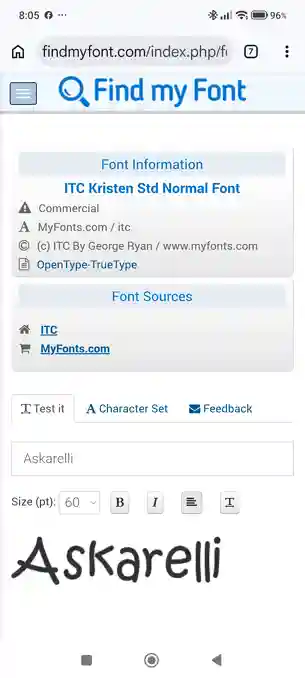
The info button opens that font's page on findmyfont.com in your browser: foundry, copyright line, file format, and the sources that sell it — ITC and MyFonts in our test. A Test it tab renders any wording you type at an adjustable size, alongside a character set and a feedback tab.
About our testing
Our five-image stress test was run against the Find my Font desktop application, where it scored a perfect 5.0 / 5.0 — see the full Find my Font review for the image-by-image results. We have not re-run that test through the Android app. The two share a catalogue and a matching engine, but not a workflow: the desktop edition can also search the fonts installed on your own machine, which the app cannot.
To keep the app comparable with every other tool we review, we did not point the camera at a printed sign. We opened the same test image on the handset, so the engine saw the identical artwork used in all our other tests — removing lighting, focus and angle as variables and leaving only the matching engine under examination.
Pros & Cons
Strengths
- The largest catalogue of any tool we have reviewed — over 1.26 million fonts, the same database the desktop edition searches.
- Genuine image-preparation tools on the phone: threshold, rotation, automatic detection, paint selection and perspective correction.
- Handles the cases that defeat one-tap apps — connected script letters, fragmented lettering and signs photographed at an angle.
- Transparent results: a percentage score, foundry, source and licence status per candidate, plus the fonts searched and time taken.
- Separate preview text renders every match in your own wording, making a shortlist easy to compare against the original photo.
Limitations
- Metered rather than free: five identifications per 24 hours, after which you wait, buy credit, or pair the app with a desktop Pro account to lift the cap.
- Steeper learning curve than any rival app — the letter-selection screen rewards patience and punishes a careless tap.
- Latin script only, and a maximum of seven letters per identification.
- Needs a connection: matching runs on Softonium's servers, and the credit counter means there is no offline fallback.
Free to a daily limit, then credits
The app is free to install and comes with a bonus of 30 identifications on first use, then settles to 5 free requests every 24 hours. Run the counter down and you can wait for it to reset, buy a credit pack, or move to the desktop edition. There is no subscription — credits are one-off purchases that do not expire.
+30 identification requests, tied to the one device.
+200 identification requests, tied to the one device.
Unlimited requests across all of your Android devices.
Prices as shown in the Android app's Purchases screen in euros, November 2026. The Unlimited pack is described there as covering all of your Android devices. Fonts you then license are bought separately from the foundry or reseller.
Already own Find my Font Pro? Skip the quota
Softonium lets you connect a Pro account on your PC to a mobile device, which grants that device unlimited identification requests at no extra cost. If you already own the $49 Pro desktop edition this is the cheapest route to unlimited, and it undercuts the €15.99 pack above. The setup is described here.
Get Find my Font on your phone
Photograph type wherever you find it and match it against 1.26 million fonts on iPhone, iPad or Android — five identifications a day, free.
More ways to find a font from an image

Free, strong on headline and logo lettering.

Matches activate in Creative Cloud apps.

Best for Chinese, Japanese and Korean.
Last updated · See the full comparison table
Comments
No comments yet. Be the first to share your experience.
Leave a comment