
The web tool, built for spotting type in the wild
The WhatTheFont app is MyFonts' mobile companion to the website reviewed here. It runs the same identification engine against the same catalogue, so the matches you get are broadly what the desktop site would return. What changes is how you get the image in: instead of finding a file and uploading it, you point your phone at the lettering in front of you.
That makes it a different tool in practice even though the engine is identical. Typography you encounter away from a desk — a restaurant menu, a film poster, signage, packaging in a shop — is awkward to capture for a web tool and trivial for a phone. Photograph it, crop to the word you care about, and the app does the rest. You can also pull in a picture already sitting in your camera roll, which covers screenshots and saved inspiration.
The flip side is that a phone camera introduces the exact problems font matching struggles with most: angled shots, uneven lighting, curved surfaces and motion blur. The web version at least lets you prepare an image before uploading. If a photographed sign refuses to match, it is usually worth retaking the shot square-on and well-lit rather than assuming the typeface is absent from the catalogue.
What the app offers
Photograph lettering directly in the app and send it straight to the matching engine — no saving the file and uploading it later.
Pick an existing photo or screenshot from your library, which covers type you have already captured or saved from elsewhere.
Searches the same 400,000+ font database as the website, so results match what the desktop tool would give you for the same image.
Trim the shot to the word you want before matching. Cropping tightly to a single line of text is the biggest lever on accuracy.
Matches link through to their MyFonts listing, so a font spotted on the street can be licensed before you get back to your desk.
The app is free to download and free to identify with, in line with the website. You only pay if you choose to license a font.
Pros & Cons
Strengths
- Captures type where you actually find it — signage, menus, packaging and posters that would never make it to a desktop upload.
- Same engine and same 400,000+ font catalogue as the website, so you are not trading accuracy for portability.
- Free to download and free to use, with no account needed before you can identify something.
- Results link straight to MyFonts, closing the gap between spotting a typeface and licensing it.
Limitations
- Phone photography works against you — angle, lighting, curved surfaces and blur are precisely the conditions that break glyph matching.
- Less room to prepare an image than on desktop, where you can straighten, boost contrast and clean up a crop before uploading.
- Inherits the website's blind spots: the catalogue is commercial MyFonts stock, so free typefaces from Google Fonts or DaFont largely go unmatched.
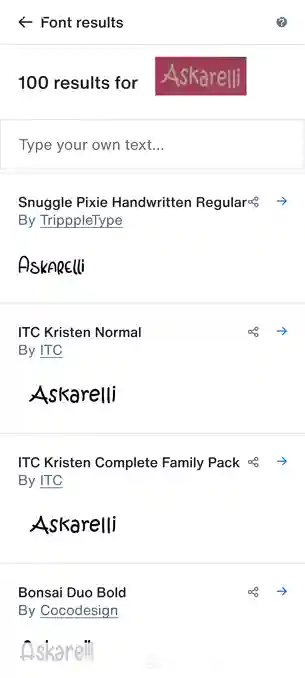
- Ranking can be erratic — in our run the correct face sat at position 20 of 100, behind lookalikes that matched the lettering far less closely.
- Requires a connection — identification runs against MyFonts' servers, so there is no offline mode.
How to use the app
From spotting a typeface on the street to a licensed font, in five taps. Tap any screenshot to enlarge it.
Search the Play Store or App Store for WhatTheFont — the listing you want is published by Monotype, MyFonts' parent company. At 17 MB it is a small download, free to install, and you can identify fonts without creating an account. It has passed a million installs on Google Play, though its 2.8★ average across 7,000 reviews is a fair warning that the experience divides people.
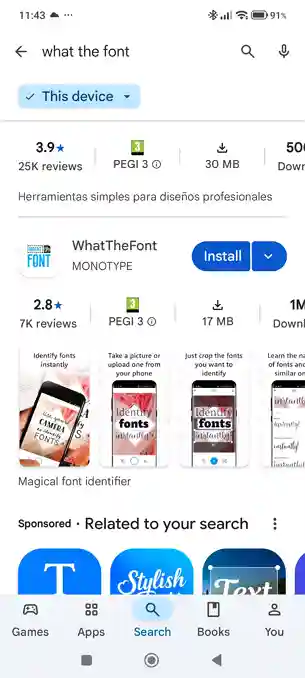
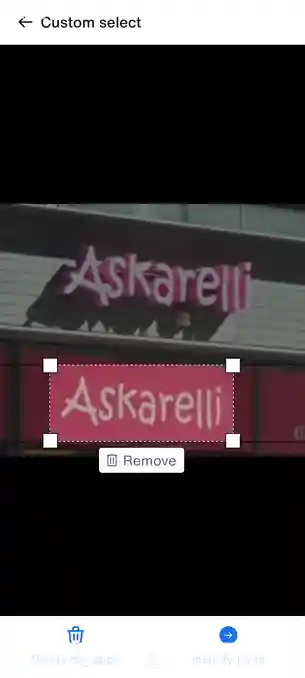
Photograph the lettering or pick a shot from your camera roll. The app scans the image and auto-selects the areas it finds text in — you just tap the one you want. If it misses the lettering you are after, drag the corner handles on the Custom select screen to draw the box yourself, then tap Identify fonts.
The app returns a long ranked list — 100 candidates in our test — each showing the font name and its foundry, rendered in the word you photographed. A "Type your own text" box at the top re-renders every result in wording of your choosing. Ranking is not always sensible: in our run the correct face, ITC Kristen, was buried at position 20 with no obvious reason, behind a string of weaker lookalikes.
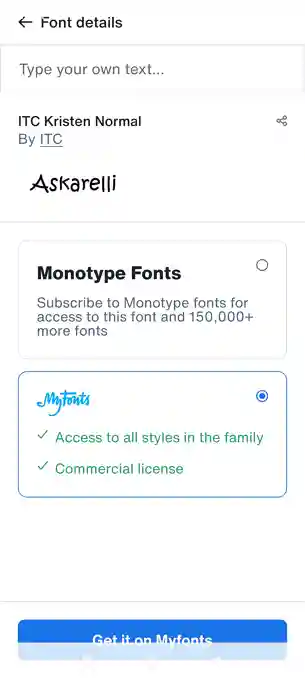
Tapping a match opens its detail page and offers two routes to the file: a Monotype Fonts subscription covering that font and 150,000 more, or a one-off MyFonts purchase that includes every style in the family plus a commercial licence.
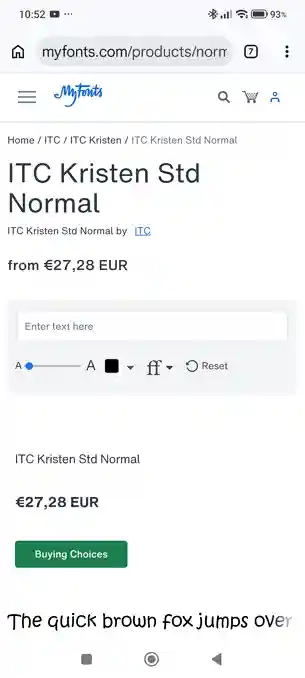
Choosing MyFonts hands you off to myfonts.com in your browser, on the normal product page for that typeface — price, preview tool and Buying Choices. The font we tested started at roughly €27, so pricing is per family exactly as it is on the desktop site.
About our testing
Our five-image stress test was run against the WhatTheFont website, where it scored 3.6 / 5.0 — see the full WhatTheFont review for the image-by-image results. We have not re-run that test through the app, and because the two share an engine and a catalogue the scores would largely restate each other. The practical difference is image quality: a photograph taken on a phone is typically a harder starting point than a file prepared on a computer, so expect the app to need a better shot to reach the same answer.
To keep the app comparable with every other tool we review, we did not point the camera at a printed sign. We opened the same test image on the handset, so the engine saw the identical artwork used in all our other tests leaving only the matching engine under examination.
Free to download, free to use
The app is free, matching the website — Monotype makes its money when you license a typeface, not when you identify one. There is no premium tier and no in-app purchase: both routes out of a match leave the app entirely, either into a Monotype Fonts subscription covering 150,000+ families or a one-off MyFonts purchase of the family you found, priced per foundry and family (around €27 in our test).
Get WhatTheFont on your phone
Photograph type wherever you find it and match it against 400,000+ fonts — free, on iOS and Android.
More ways to find a font from an image

Searches 1.2M+ fonts, with free alternatives.

Desktop app, top score on hard images.

Free, strong on headline and logo lettering.
Last updated · See the full comparison table
Comments
No comments yet. Be the first to share your experience.
Leave a comment